
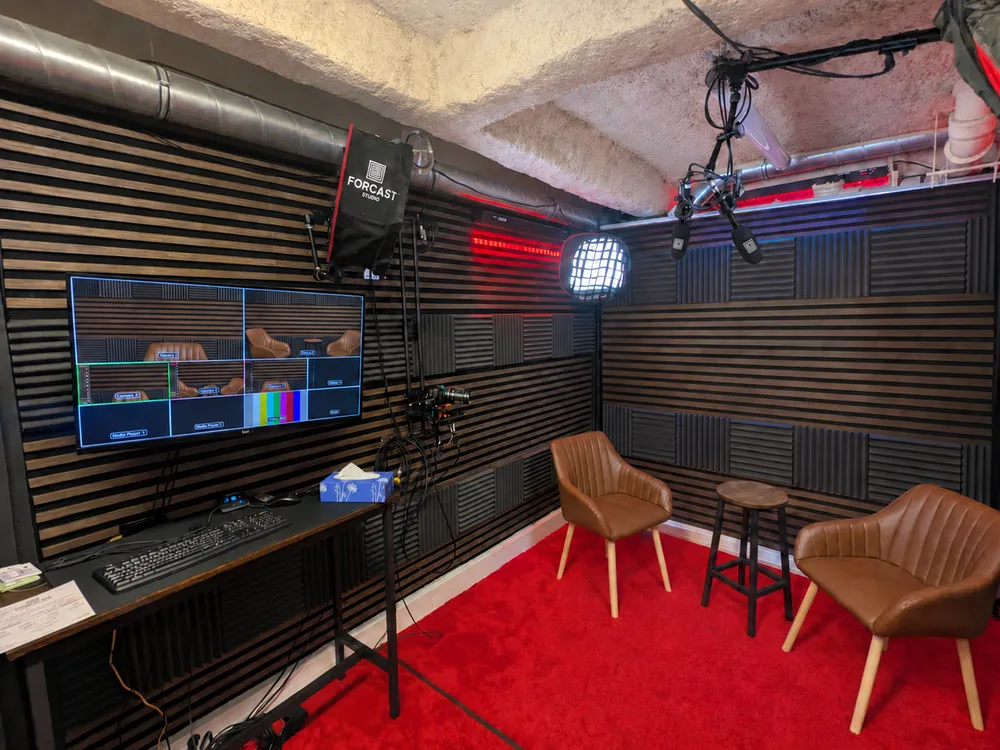
Webcast (or live broadcast) has become the go-to communication tool for companies: official announcements, product launches, AGMs, conferences, masterclasses... Unlike webinars which remain a teaching format, webcasts aim for TV broadcast quality and a massive audience. But succeeding at a webcast in Paris requires the right studio. In this guide, we explain everything: what a webcast is, the equipment needed, the criteria to choose a studio in Paris, and the real ROI of a pro live broadcast.
1.What exactly is a webcast?
A webcast is a live (or delayed) video broadcast on the internet, with broadcast quality equivalent to TV: multicamera, broadcast sound, control room, graphic design. It differs from a simple home livestream by its professional production. In Paris, we talk about webcast when the event involves a TV stage with at least 2 cameras, a video control room, and simultaneous broadcasting to multiple platforms (YouTube, LinkedIn, Vimeo, private platform). Webcasts can be public (open audience) or private (secure link for employees or customers).
2.Webcast vs Webinar vs Livestream: the key differences
These 3 formats are often confused. Here's the technical distinction:
- Webinar: interactive 'classroom' format, webinar platform (Zoom Webinar, Livestorm), 1-2 cameras max, moderate audience, educational focus with Q&A.
- Livestream: amateur or semi-pro live broadcast, 1 camera, YouTube/Twitch/TikTok platform, little or no production, informal tone.
- Webcast: TV broadcast production, 2-4 4K cameras, control room, decorated set, pro graphic design, multi-platform delivery, massive audience, corporate or event format.
- Simple rule: if the financial or reputational stake is high (CEO, AGM, product launch), a webcast is what you need.
3.Essential equipment for a pro webcast
A pro webcast in Paris relies on a precise technical chain. The slightest weak link and overall quality drops:
- 2 to 4 compact 4K cameras for dynamic multicam without visible camera operators.
- Video control room (vMix Pro or Blackmagic ATEM Mini Pro ISO) for live mixing.
- Professional broadcast microphones (several models) for TV-quality sound.
- Pro 3-point softbox lighting for a flattered face on screen.
- Symmetric dedicated 100 Mbps fiber minimum for stable RTMP streaming.
- Pro encoder (vMix, OBS Studio on a dedicated machine) for simultaneous multi-platform delivery.
4.How to choose a webcast studio in Paris?
Several criteria distinguish a real webcast studio from a simple equipped room:
- Native 4K multicam (not 1-camera capture with reframed shots in post-production).
- Control room run by a technician experienced in live production.
- Live graphic insertion: logos, lower thirds, slides, polls, countdowns.
- Simultaneous multi-platform delivery (custom RTMP, YouTube, LinkedIn, Vimeo, private players).
- Edited file handed over at the end of the session, ready to publish as a replay.
- Technical plan B: ask the studio what is planned if something cuts out (connection, mic, encoder).
5.How much does a webcast cost in Paris?
Prices depend on duration, number of cameras, and production level. Indicative ranges in Paris (excl. VAT), which vary widely between providers:
- Simple webcast (1 guest, 2 cameras, 30 min): €600-1200 in Paris studio.
- Standard webcast (2-3 guests, 3 cameras, 1h, multi-delivery): €1200-2500.
- Premium webcast (round table 4 guests, 4 cameras, 2h, edited replay): €2500-5000.
- Custom event webcast (AGM, launch, dedicated set): €5000-15000.
- At ForCast.studio Paris 12th, the Live Cut package (3-camera live control room, titles and logos, multi-platform streaming, edited file at the end of the session + 15 shorts per hour) starts at €229 TTC for 1h, €458 TTC for 2h.
6.Why webcasts generate better ROI than physical events
Unlike a physical event (room rental, catering, guest travel), a pro webcast clearly lowers the cost per attendee:
- Wide audience: production cost stays the same whether you have 500 or 5,000 viewers.
- No guest logistics (no travel, tickets, hotels, meals).
- Lasting replay: your webcast keeps generating leads weeks after the live.
- Simultaneous capture for reuse: social clips (Reels, Shorts), blog articles, audio podcast.
- Cost per contact: often lower than a physical event, to be measured on your own figures.
Comparison: Pro webcast vs amateur live from desk
| Criterion | Amateur live (desk) | ForCast.studio Webcast |
|---|---|---|
| Number of cameras | 1 webcam | 3 4K cameras (up to 5 as an option) |
| Sound quality | USB mic | Pro broadcast microphones |
| Graphic design | None | Logos, lower thirds, integrated slides |
| Multi-platform delivery | 1 platform | Simultaneous multi-platform |
| Replay | Auto-export platform | Edited file handed over at the end of the session |
| Technical backup | None (cut risk) | 800 Mbps fiber + on-site technician |
| Broadcaster credibility | Amateur | TV broadcast |
What's included in our ForCast.studio webcasts
- Multicam 4K control room (3 cameras, 4th and 5th optional at +€90 TTC/h)
- Technician / stage manager on site
- Titles and logos added live
- Simultaneous RTMP streaming to YouTube, LinkedIn, Twitch, Facebook or a private platform
- Zoom/Teams duplex for remote speakers (mix-minus)
- Edited file at the end of the session + 15 shorts per hour
- 800 Mbps fiber
- Technical test before going live, to plan within your booked slot
Who is this guide for?
- Executives organizing AGMs, conferences or official announcements
- Brands producing live product launches
- Event agencies integrating digital with physical events
- Media and journalists producing duplexes or broadcast shows
- Corporate communication teams producing live B2B content
- Trade show organizers wanting live broadcasting
FAQ
Do we need an in-studio audience for a webcast?
No, it's not essential. The set hosts 1 to 4 seated people. The audience follows online and can react through the platform chat.
Book online, from €89 incl. VAT per hour.