
Remote work has normalized video conferencing. But for an important keynote, a general meeting or a media intervention, your computer's webcam is no longer enough. Discover how the studio transforms your image.
1.What is a studio Zoom Room?
A studio Zoom Room is not just a meeting room. It's a connected TV set where your image is captured by professional 4K cameras, your voice by broadcast microphones, and the whole thing is sent into your Zoom (or Teams) meeting as if you were a simple webcam. For your interlocutors, the difference in quality is striking.
2.The two main use cases
There are two ways to use duplex technology in studio:
You are the guest speaker
You come to the studio to participate in a conference held elsewhere (or online). We send your high-quality image to the organizers.
You are the host
You're on set and you welcome guests who are at home. We display your guests on the studio screens and integrate them into the final video stream.
Essential Stream €89 · Pro Edit €149 · Live Cut €229 per hour incl. VAT, reduced rates for 2 to 8 hours.
Book the ForCast podcast studio in Paris 12
3.Why use a studio for a video call?
- The lighting is sculpted to make you look your best.
- The background is professional (real set or green screen).
- The connection runs on the studio's 800 Mbps fiber, no Wi-Fi.
- A technician handles unexpected issues, you stay focused on your speech.
4.Duplex: Inviting the world onto your set
If you're producing a show or a webinar from the studio, you don't want to be limited to people physically present. The duplex system allows you to display a remote guest (via Zoom or Teams) on a feedback screen so you can dialogue naturally, while integrating them cleanly into the video direction for the audience (Picture-in-Picture or fullscreen).
5.Compatible platforms
Zoom and Teams are validated. Other tools are tested with us before the session:
- Zoom & Zoom Rooms
- Microsoft Teams
- Google Meet
- Webex
- Other video call tools: to be tested with us before the session
6.Hardware setup for a professional duplex
A pro duplex relies on a precise technical chain: stream quality depends on the weakest link. Here are the essential elements:
- Dedicated fiber (10 Mbps upload minimum, ideally symmetric 100 Mbps) to guarantee 1080p quality without buffering.
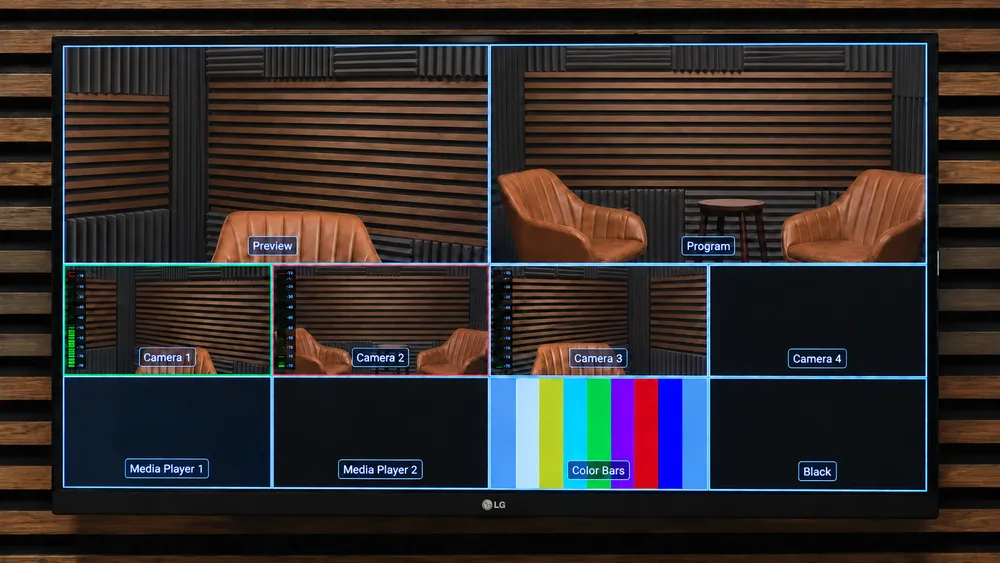
- A video mixer (vMix, ATEM Mini Pro) that injects your clean feed into the meeting platform.
- A Mix Minus system: your remote guest hears everything EXCEPT their own returned voice (otherwise unbearable echo).
- A 4K camera with SDI/HDMI output (not a webcam) for broadcast-quality image.
- A return screen (multiview) so you can see participants during the intervention.
7.The 5 mistakes that ruin a duplex
Five common mistakes make a pro duplex look like an amateur Zoom call:
- Using Wi-Fi: the stability of wired fiber is non-negotiable for a live duplex.
- Plugging the mic into the computer: sound goes through the Zoom codec (compressed, filtered audio) instead of the mixer (broadcast 48 kHz quality).
- Forgetting Mix Minus: your guest hears their own echo and can no longer speak clearly.
- Bad camera framing: too low (unflattering downward angle) or too far (loss of eye contact).
- No technical rehearsal: testing 30 minutes before the live avoids most incidents.
Comparison: Native Zoom vs Pro Studio Duplex
| Criterion | Zoom from desk | ForCast.studio Duplex |
|---|---|---|
| Image quality | Compressed 720p webcam | 4K broadcast camera |
| Sound quality | Built-in mic, echo | Pro broadcast microphones + Mix Minus |
| Lighting | Office light | 5 LED softbox panels |
| Connection | Home Wi-Fi | 800 Mbps fiber |
| Background | Office wall | Pro set or green screen |
| Credibility | Standard | Expert / TV broadcast |
What's included in our duplex sessions
- Blackmagic Micro Studio Camera 4K cameras with broadcast SDI output
- ATEM Television Studio Pro 4K video control room
- Mix Minus system (echo-free audio for remote guests)
- 800 Mbps fiber line
- Return screen in front of you (out of frame)
- Compatible with Zoom and Teams (other tools to be tested before the session)
- Control room technician present throughout the session
- Technical test before the live, to plan within your booked slot
Who is this solution for?
- Executives speaking at keynotes or AGMs via video
- Journalists and media experts in TV/radio duplex
- Trainers running virtual classes with a pro look
- Hybrid companies organizing remote AGMs or board meetings
- Communication agencies producing digital events
- Politicians and decision-makers speaking remotely at conferences
FAQ
How many remote guests can we have?
We can manage multiple simultaneous streams, displaying for example 4 remote guests in a mosaic on the set screen.
Essential Stream €89 · Pro Edit €149 · Live Cut €229 per hour incl. VAT, reduced rates for 2 to 8 hours.